
[DigitalToday reporter Jinju Hong (홍진주)] Apple has changed iOS 26.4 so users can check data use by each device connected to an iPhone Personal Hotspot directly in the settings screen.
NineToFiveMac reported on March 31 local time that the change makes it easier for users to see at a glance who used their hotspot data and how much.
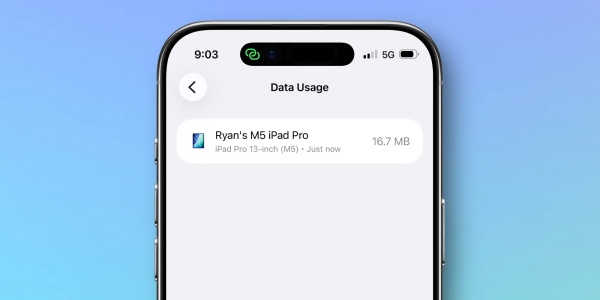
In iOS 26.4, a new Data Usage menu appears at the bottom of the Settings app’s Personal Hotspot screen. The menu shows up only when the hotspot was used recently. It is not a fixed, always-on item, but displays related statistics only when there is recent usage history.
Inside the Data Usage menu, usage is broken down and shown by each device connected through the hotspot. Users can see how much data each device used via the hotspot. It directly helps not only users who alternate connections among several of their own devices such as iPads or MacBooks, but also those who often share a hotspot with people nearby, to check which device consumed a lot of data.
There is also a way to reset the usage statistics. The outlet said the data does not have a separate delete button, but can be reset by resetting overall cellular usage statistics in Settings to Cellular. Rather than resetting only the hotspot item, the per-device hotspot usage is bundled together with iOS’ cellular usage statistics reset flow.
The significance of the change lies in making hotspot usage more visible. For users on plans based on a set data allowance in particular, it is important to track when hotspot data was used heavily and on which device. NineToFiveMac said iOS 26.4 provides a convenient way for users who need to check data usage closely.
Apple appears to have provided related data in a different location within Settings in the past, but some have said it was hard for users to notice it.
 Jinju Hong
hongjj@d-today.co.kr
Jinju Hong
hongjj@d-today.co.kr