
[DigitalToday reporter Seulgi Son] I tried n8n, a name still unfamiliar in South Korea but already known in overseas developer communities as a rival to Zapier. It is a workflow tool that connects repetitive tasks like blocks to automate them. The key is that users can insert an AI model in the middle, enabling automation where AI makes decisions.
I set the project goal as building a bot that summarises Procurement Service notices. It seemed useful for reporting because companies with access can check national project information. It took 1 hour from installation to receiving Telegram alerts.
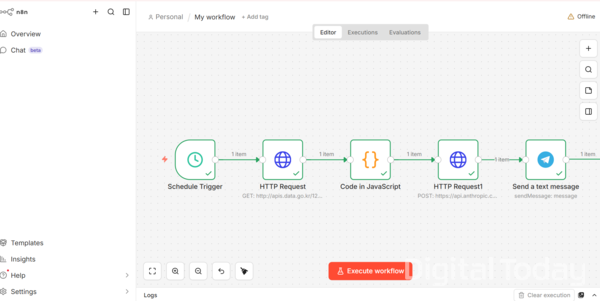
n8n works by selecting blocks, or nodes, that contain specific functions and then connecting them to match each step. A node is the unit users place on the canvas and link. Each node already has the function coded inside. Instead of writing new code, users pick finished function blocks, connect them and fill in parameters. There are separate nodes for sending HTTP requests, sending Telegram messages and running JavaScript, and connecting them in order completes a single automated workflow.
It looks like no-code, but internal data is processed in JSON, which is another feature. Each node takes the output of the previous step as its input. It seemed easier to design automation once you understand how data flows through the process.
The overall structure has 5 steps: a schedule trigger that runs the task at a set time; an HTTP request that calls the Nara Market API; a JavaScript code node that organises the retrieved information; an HTTP request that calls the Claude API; and a Telegram message send. I asked Claude which nodes were needed and built it that way.
I first set the schedule trigger parameters to run every day at 9 a.m. Because the Nara Market API is not a real-time push structure, a polling method that checks data at regular intervals was suitable.
Next, I used an HTTP request node to call the Nara Market API. Nara Market notice data can be accessed by obtaining an API key from the Public Data Portal. It also provides guidance documents that summarise the method, URL and required parameters, and they must be referenced when building queries.
I kept running into errors in the query configuration, including date and format. In the end, I attached the guidance document to Claude as-is. When I applied the returned input values 그대로, the data output normally.
Now comes the task of organising the data to pass to the AI. The API response, delivered as a JSON file, includes various metadata. If you send it to the AI as-is, the results become scattered and it also consumes many input tokens. I therefore added a code node to extract only the needed fields, such as notice title, notice category, ordering agency and key schedule, and pass those on.
For AI summarisation, I used Anthropic's Claude API. n8n has no Claude-specific node, so I used another HTTP request. The method is to insert the API key in the Authorization header, set the content type, and then build the model name and message format in the JSON body. It is said this method is more flexible when there is no dedicated node or the latest model has not yet been reflected. Beginners may find header configuration or JSON body structure unfamiliar, so it is better to ask the AI for the input values.
For the final output format, you write the prompt in JSON and enter it in the node parameters. I got help from Claude. I specified that notices should be grouped into 3 areas - construction, services and goods - include key business content, and be summarised in 5 lines or fewer.
The final step is sending messages through a Telegram bot. Various notices with deadlines in early to mid-March were organised by category and sent to Telegram. A guidance phrase, "Message automated by n8n," is automatically appended at the bottom of the Telegram message. It can also be disabled in the Telegram node options.
Workflow automation is not a grand AI project. But it clearly has advantages in handling tasks that are annoying to do by hand. I think it can be used in reporting work by attaching it to repetitive tasks such as monitoring news keywords, summarising press releases and organising reporting schedules. Unlike an agent method like OpenClaw, where AI judges and executes on its own, n8n runs AI only within the flow designed by the user. In work automation, being able to use only needed functions without giving unnecessary permissions to AI can instead be a strength. If built on a cloud server instead of a local PC, it can operate 24 hours a day even when the computer is turned off.
 Seulgi Son
sageson@d-today.co.kr
Seulgi Son
sageson@d-today.co.kr