
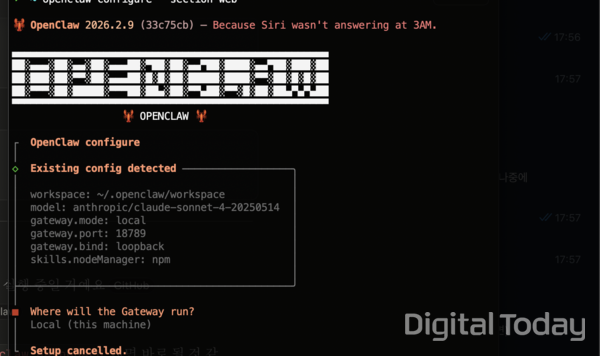
[Digital Today reporter Seul-gi Son] I recently tried OpenClaw, a hot topic in the tech industry. OpenClaw is an open-source AI agent framework that runs in a user’s local computer environment and can be linked with Telegram, Slack and Discord. It offers functions such as browser automation, messaging-platform integration and file management. From my experience, its usefulness is questionable.
I have no development experience. Because I majored in music, I have only used Max, a node-based object-oriented language for multimedia. I searched YouTube with keywords such as “non-developer OpenClaw installation success,” summarised the content with Gemini and then followed the installation steps. I note in advance that this assessment of OpenClaw is based on my personal experience.
The installation itself was easy. I only had to enter the command “npm install -g openclaw” in the terminal. The problem emerged after installation when connecting an AI model. I connected Gemini and thought there would be no additional charges because I use a $20-a-month plan. There was no problem issuing an API key in Google AI Studio.
But even after entering the API key and continuing the installation, the connected Telegram bot did not respond. After debugging, I found the model provider in the settings file had been incorrectly specified. An error message said, “Unknown model: Anthropic/Gemini-1.5-Flash,” meaning the Google model had been routed to Anthropic. The solution was to open the JSON settings file and manually add “google/” in front of the model name.
I fixed it with Gemini’s help, but the problem persisted. Even when calling the Google API, I got a “404” response error. A message also appeared saying “Gemini 1.5 Flash cannot be found in the API beta version,” and the model was an older version excluded from the API list. When I changed the model name to “Gemini 2.0 Flash,” I got a “429 rate limit” error, followed by a payment error. The cause was hitting the per-minute request limit on the free-tier model.
I eventually decided to switch to a paid plan. Since I was paying anyway, I moved to Anthropic’s Claude API model, which is said to be specialised for coding. From that point, I continued asking Claude about the installation. I could not write a hands-on review if I failed. At 11:30 p.m., while waiting for the connection after entering payment information, I received a call from an unknown number. The card issuer was checking an overseas payment made with a credit card I had not used for a long time. In any case, I received an API key.
This time, a problem occurred while inserting the key into OpenClaw’s authentication file. OpenClaw did not recognise the API key just by registering it as an environment variable. I had to put it directly into a separate authentication file. I had to run a Python script in the terminal and edit the JSON file myself.
About 3 hours after starting the installation, the bot connected to Telegram began responding. This process required a basic understanding of terminal commands, JSON file structure and API authentication methods. I thought it would not be easy in practice for a user with no development experience to do it.
The first task I assigned OpenClaw was automated news monitoring. I used “cron,” a basic OpenClaw function specialised for repetitive tasks. I set it to search for the latest AI-related news every 30 minutes and automatically post it to a Telegram channel (@ai_breaking_kr).
Web search worked. It also provided summaries. The problem was that it could not produce refined results. The first response was overly condensed. Later responses came back in English. It said, “Microsoft’s AI CEO predicted that most white-collar computer work will be fully automated within 12 to 18 months, while infighting is taking place at both xAI and OpenAI,” but it included no outlet name, article link or publication time.
That did not fit the clipping purpose of verifying when, where and by whom something was reported. I revised the prompt to force a format of “hyperlinked article title and one-line summary,” but then I got an error saying the web search API key was not set. The same function had worked just minutes earlier, but after the session changed it did not call the search tool at all. The lack of consistent behaviour by the AI agent was the biggest obstacle to practical use.
The next challenge was ordering bottled water on Coupang. Installing a Chrome extension called “OpenClaw Browser Relay” allows granting permission for the AI to manipulate the browser. But even installing the extension felt unfamiliar. In Chrome developer mode, I had to use “Load unpacked extension,” enter a hidden folder path manually, and the extension was sometimes disabled when Chrome restarted.
There were limits even after connecting. The HTML code contained in a single Coupang webpage was close to the amount of text that the configured Claude Sonnet 4 could process at one time. The error message said a single Coupang page consumed 188,000 tokens, and considering the space for the AI’s answer (34,048 tokens), it would exceed the per-request context window.
Given that most major South Korean platforms such as Naver and Kakao are built on heavy JavaScript, token consumption seemed likely to be excessive for an AI agent to manipulate the browser.
Considering the per-minute token limit of 30,000, it ultimately allowed entering one command per minute. Ordering a product on Coupang requires 4 to 5 page transitions, such as home, search results, product details and purchase, which would take about 5 minutes. Another variable is that the Coupang login page resets every time Chrome is opened and the OpenClaw Chrome extension turns off.
This time I asked, via Telegram, to create an Excel file. The response was that I would need to separately integrate the Google Sheets API or additionally write a Python script.
Chatbots such as ChatGPT, Claude and Gemini create a file immediately with a single request like “make an Excel.” OpenClaw, by contrast, required additional API integration and script writing. That is because OpenClaw is basically a framework for combining tools, not a finished service. It may be a platform with high flexibility for developers, but for ordinary users it leaves the question: “Why do this for something that can be done directly in the Claude app?”
For work automation, software-as-a-service tools such as Zapier, IFTTT and Make are already established in the market. They allow building workflows such as “notify Slack when news with a specific keyword appears” and “automatically save Gmail attachments to Dropbox” with a few clicks and no code. The number of services that can be connected also runs into the thousands.
For AI agents such as OpenClaw to replace them, they would have to provide at least the same level of stability and convenience. For now, constraints such as complex settings, inconsistent outputs and token limits seem significant. Even so, it was impressive to receive news search results on my AI agent bot linked to Telegram and to be able to access a Coupang webpage without touching it.
In the tech sector, there are many forecasts that AI agents will threaten the position of software-as-a-service. Mustafa Suleyman (무스타파 술레이만), Microsoft’s AI CEO, predicted in a recent Financial Times interview that “most white-collar computer work will be fully automated within 12 to 18 months.” But in reality, the AI agent could not handle ordering bottled water, clipping news or creating an Excel sheet at a satisfactory level. In my experience, it still does not seem easy to hand something off to AI and do something else.
 Seul-gi Son
sageson@d-today.co.kr
Seul-gi Son
sageson@d-today.co.kr