
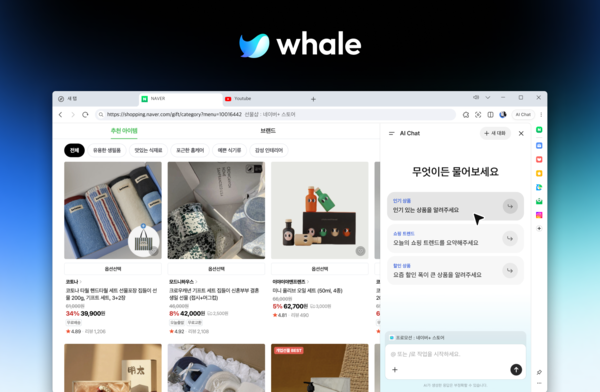
Naver Whale has officially launched AI Chat, which provides summaries, translation and question-and-answer services based on webpage content and also supports tab organisation and schedule management.
Naver said on Wednesday it applied the AI Chat function to the Whale browser and, marking the 10th year since launch, also revamped its logo and brand slogan.
AI Chat answers questions based on the page being viewed or the content of tabs selected by the user. Without separately sending a page address or the main text, users can summarise long articles or request translation of foreign-language pages from the sidebar.
Users can check answers and continue with follow-up questions while keeping the screen they were reading. They can also save needed answers to a scrapbook to review later.
It is also linked to the existing Quick Search feature. If a user drags a specific sentence or content on a webpage and selects AI Chat in Quick Search, they can ask a question immediately based on that content.
Beyond information searches, it also supports in-browser tasks. Users can organise open tabs with AI Chat, and if they connect Naver Calendar, they can view, add and edit schedules. For some actions that are difficult to undo, such as adding schedules, the browser asks for user confirmation before executing them.
It also provides a function that suggests tasks needed depending on the current page content. It suggests translation on foreign-language pages and summaries on pages with long text.
Whale also changed its brand logo and slogan in this update. The new slogan is "Journey to the Next AI Browsing", and it simplified the whale-motif symbol and changed the main colour to deep blue tones.
Hyo Kim (김효), Whale leader at Naver, said Whale has steadily improved features that increase web-use convenience, including Quick Search and the sidebar. He said it would support a natural flow from information searches to executing tasks inside the browser through AI Chat.
 Lee Ho-jung
lhj@d-today.co.kr
Lee Ho-jung
lhj@d-today.co.kr