
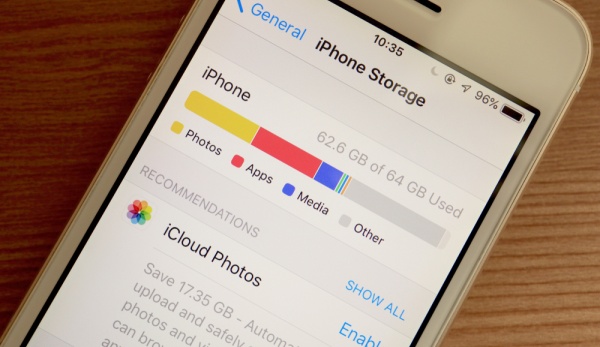
[DigitalToday reporter Yoonseo Lee] When iPhone storage is running low, users do not need to delete photos, videos or unused apps blindly. On Sept. 1 (local time), IT outlet Engadget said checking the iPhone Storage menu in Settings lets users see at a glance where storage is being used, including items that usually go unnoticed.
The most common way to free up iPhone storage is to delete unused apps and sort through old photos and videos. This can deliver the fastest results, especially on devices with smaller storage. If space is still low after doing so, other items may be taking up capacity.
In that case, go to Settings > General > iPhone Storage. This screen shows storage use by category, including photos and apps, and lists apps that take up the most space in order. Streaming apps that were not deleted after subscriptions were cancelled, or services that have not been used for a long time, are typical cleanup targets.
The impact on personal data varies depending on how users clean up, so they need to check before deleting. Some options free up space while keeping user data intact, while others remove apps along with related data. These methods may not have as big an effect as deleting photos or videos, but they can help gradually create some free space.
On each app’s detail page, users can separately check the size of the app itself and the space taken up by documents and data. Selecting Offload App removes only the app while keeping related documents and data, but Delete App can remove related data as well, so users need to distinguish between the two functions.
Attachments in messages and emails, downloaded music, videos and podcasts, and voice memos can also take up more space than expected. Users also need to check the On My iPhone folder in the Files app, files downloaded in Safari, and iCloud Drive content stored on the device.
To manage storage efficiently, users should identify what is taking up the most space rather than deleting items blindly. If storage remains low after sorting photos and apps, it is effective to use the iPhone Storage menu to find apps and data that were missed and clean them up based on priority.
 Yoonseo Lee
yslee@d-today.co.kr
Yoonseo Lee
yslee@d-today.co.kr