
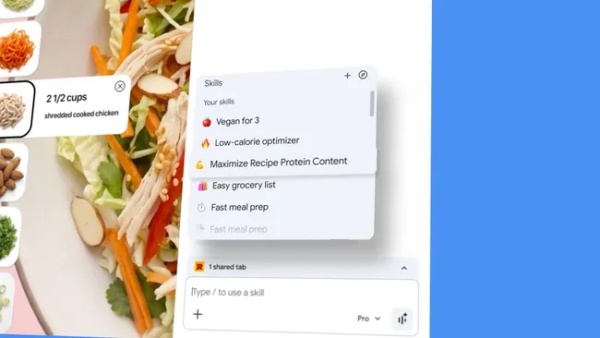
Google has added a 'skills' feature to Gemini for Chrome that lets users save frequently used prompts and run them immediately on other pages.
Tech outlet TechRadar reported on April 20 that the feature is designed to reduce repetitive input in how people use artificial intelligence and to let prompts function like a tool inside the browser.
Users can open Gemini in Chrome, run a desired instruction once, and if the result is suitable, press the save button to store it as a skill. They can later recall saved tasks by typing '/' in the Gemini panel or through the skills menu. Typical uses include summarising webpages or comparing multiple tabs.
Google also released a default skills library so users do not have to create everything from scratch. The library includes templates for frequently used task prompts and can be added to, modified and reused as needed.
As a practical example, it presented a 'meal planner' skill that reorganises meal planning based on a recipe page. The skill expanded a single meal based on information from the page and arranged it in an infographic format. It grouped ingredients by item, simplified cooking steps and reorganised the overall process along a timeline.
It also introduced a way to compare multiple tabs at the same time. A 'gift concierge' skill first asked about the gift recipient and budget, organised preferences based on open tabs and then created a comparison table. Gemini called this a 'taste read' and briefly summarised design tendencies and material preferences shown in the selected products. It then presented additional candidates in a table with similar price ranges to products already open, allowing users to compare price, materials and design differences in a single format.
Users can also create skills themselves, such as a 'comic explainer' that turns webpage content into a four-panel comic. After the user created the skill, Gemini automatically wrote the skill instructions based on the request. It then converted explanation-heavy content into a step-by-step visual narrative, reducing technical terms and reorganising it into a flow that was easier to follow at a glance. Some detailed context was reduced, however.
The feature aligns with a trend to expand Gemini from a one-off question-and-answer tool into a work assistant inside the browser. The shift becomes clearer when prompts are treated not as 'one-time instructions' but as if they are 'part of the browser'. Not every page is suitable for summarising, comparison or restructuring, and even well-designed skills can flatten content when applied broadly, which remains a limitation.
As a result, Gemini's 'skills' for Chrome is interpreted as an experiment that changes how AI is used inside the browser. If the structure of saving repetitive prompts and calling them up instantly becomes established, Gemini could expand its use beyond search assistance and into a tool involved across web browsing.
 Yoonseo Lee
yslee@d-today.co.kr
Yoonseo Lee
yslee@d-today.co.kr