
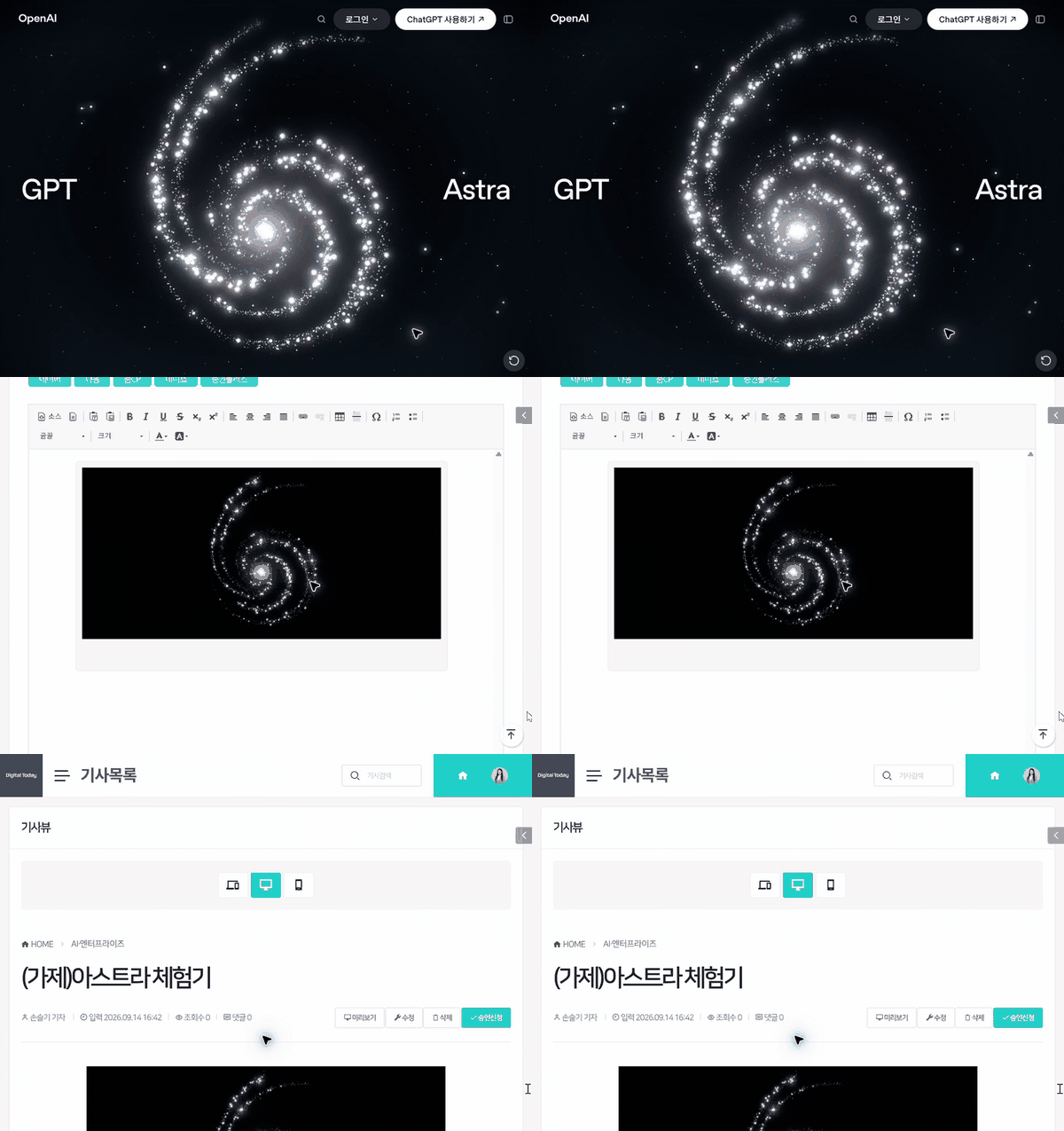
[DigitalToday reporter Seulgi Son] I tried OpenAI’s latest model, GPT-6 Astra, for web tasks I had put off because they were a hassle. I asked it to do various things, from applying for compensation over a personal data leak and deleting memberships to bargain shopping and booking Chuseok train tickets.
I failed to let go completely, but there were some unexpected gains. I thought it would be fine to hand off my weekly check of the National Assembly schedule and photo uploads for trial articles again.
Astra is designed to carry out multi-step tasks by moving between a computer, browser and work software. Its developer, OpenAI, stresses that its computer-use and web-browsing abilities have improved significantly from earlier models. Astra reads web screens through a computer-use tool, clicks the mouse or types, then checks the changed screen again and continues to the next step.
My yardstick was how much less of a hassle things became. From a strictly personal perspective, I rated each task out of 10.
The first task was applying for compensation over a personal data leak on the OTT platform TVING. I knew I was eligible after receiving a text message, but I had put it off because even logging in was a hassle.
The result after handing it to Astra was 8 points.
It was surprising just to see the AI find the TVING site on its own and enter the compensation application page. When it summarised the compensation available and the application conditions, I found myself saying, "Oh?" It then processed, in order, tasks a person still had to do, such as identity verification and selecting compensation.
The problem was logging in. More precisely, the reporter had forgotten both the ID and password. I thought I had logged in through an external account, but I did not even know whether it was a Google account or a CJ ONE account.
When I told Astra it was a hassle, it found the password reset page. But I hesitated to leave it to handle phone-based identity verification and entering a new password. It felt like the security issue would become bigger than the original goal of reducing hassle the moment I revealed the password.
In the end, I reset the password myself and left the rest of the compensation application process to Astra. Astra checked the compensation items and asked questions only for parts that required my decision. It asked which coupon to receive and whether to sign up for free phishing safety insurance, so I chose a 5,000 won discount coupon for a CGV combo and the insurance. Astra completed the rest on its own. If I had been logged in automatically, I would have barely needed to touch anything.
The next task was deleting my account on Gangnam Unni. It is an aesthetic medical platform where a personal data leak occurred recently, and I wanted to cleanly remove my information because the app collects a lot of sensitive data.
Again, it started with a login problem. I remembered signing up with KakaoTalk, but a screen asking for consent to provide additional personal information popped up during the login process. I went in to delete my information, but seeing a screen asking for more information already felt like a hassle.
Even after logging in, the web version did not lead to account deletion. Astra found a notice saying, "Some functions should be checked in the mobile app," so I took out my phone and deleted the account myself. The score was 3 points.
I also retried online shopping, which I had attempted a few months ago by hooking Claude Sonnet to OpenClaud.
Back then, I failed while trying to order bottled water on Coupang. The problem was that there was too much information on a single product page for Sonnet 4 to read at once. A per-minute token limit also kicked in, so I had to wait a long time each time I moved to the next page, and mouse control barely worked.
This time, I asked Astra to search for and buy the lowest-priced option for a product I order regularly: "Seoul Milk Protein Energy Choco 240 ml, pack of 18". I told it to find the cheapest price regardless of site, including Coupang and Naver Shopping.
Naver Shopping did not allow macro access, possibly because of Naver’s closed policy. A CAPTCHA appeared as soon as Astra searched for the product.
I asked if it could not solve the CAPTCHA directly, and Astra said it could not. It might be possible to find a workaround, but I felt it would be less of a hassle to do it myself than to look into that.
After I solved the CAPTCHA, Astra moved between multiple sellers and compared the same product. It checked whether an item that looked cheap in search results was actually sold out and whether the price changed when selecting the 18-pack option. It was also fine that it compared the actual checkout price by adding shipping fees.
The problem was the price. The item Astra ultimately found was 26,900 won, but with a 6,900 won shipping fee. That was 33,800 won in total. Thinking of how I bought it in the 23,000 won range just two days earlier on SSG.com using a weekend coupon, I could not bring myself to buy it.
I rejected it by telling Astra, "Too expensive!" Still, I gave it 5 points for checking multiple sellers under the given conditions and finding the lowest price.
Next was the notoriously difficult Chuseok train ticket booking. I needed a ticket to Ulsan on Sept. 23. I said I did not care about the time and that either SRT or KTX was fine.
Astra first opened the KORAIL website and set the departure point, destination and date. The moment it hit the search button, a notice appeared saying, "Use may be restricted if unapproved tools such as macros or developer tools are used," along with an error code. I could not even see the remaining-seat query window.
Here too, I felt it would be less of a hassle to do it myself than to look for a workaround such as jailbreaking. I gave up cleanly. The overall score was 2 points.
By contrast, I was quite satisfied with a few tasks. Checking the National Assembly seminar schedule was a representative example. The site’s user interface is in a calendar format, so grasping weekly events requires adjusting settings several times. To see detailed event information, you even have to click posters one by one.
There may be other ways, such as connecting an API, but I did not even try because it did not fit the goal of minimising hassle.
The result after asking Astra was 10 points. It gathered information with almost the same workflow as I used. It compared 72 weekly events posted on the National Assembly website with 69 seminar listings on Open National Assembly Information, and it also found differences between the two lists.
From the point where it organised event name, organiser, venue and date and time into a table, it felt better than a person. It opened posters for events of interest and checked detailed information as well. If I had done it myself, I would have had to go back and forth many times between date-by-date lists and event pages. Of course, a skilled "human worker" is faster if you look only at speed.
Thanks to Astra, I succeeded for the first time in making a GIF-format article thumbnail. It was something I had tried and failed at a few times when writing other reportage pieces and then stopped touching. I wanted to save Astra’s browser操作 as a moving image.
I recorded the screen using Windows’ basic capture tool. I tried again to see if I could even leave starting the recording to it. Astra found the capture tool installed on the computer, but control stopped when a safety check kicked in saying, "I cannot reliably confirm the current browser address." In the end, I pressed start and stop recording myself.
Since it obviously would not know where the video was saved, I asked Astra to find it. The thumbnail included a scene of Astra checking motion graphics promoting Astra on the OpenAI website and a scene switching back and forth to the company’s article writing screen.
It then cropped out the chat window and unnecessary edges of the screen, and it also adjusted long sections to play faster. The finished version was about 10 seconds long. The score was 9 points. I still had to start and stop the screen recording myself, but I barely had to touch the process of finding the file, trimming the video and making it into a GIF.
The unexpected gain was the task of uploading the thumbnail to the article editing system after finishing the story.
When writing trial articles, the most labor-intensive part is uploading photos. You have to find photos that match the story, decide what to crop, match the file format, add captions and register them. I strongly want to upload them roughly, but I keep in mind the editor-in-chief’s usual line that "photos are also journalism," so I struggle to write captions.
I tried leaving this task to Astra. After I logged it into the company website, Astra found its way into the article writing screen. It registered the headline and lead image and then saved the draft.
I told it to set the section to "AI & Enterprise" and the title to "(Tentative) Astra hands-on." It set the thumbnail as the lead image and added the caption "[Photo: Captured from ChatGPT]." When a WebP-format image would not register in the content management system, it changed it to PNG itself and uploaded it again. When an error occurred, it kept going by changing the file format instead of calling me back. That fit the goal of solving hassle exactly.
I checked through the article preview to see whether the GIF moved properly. I was satisfied and gave it a perfect score.
 Seulgi Son
sageson@d-today.co.kr
Seulgi Son
sageson@d-today.co.kr