
OpenAI on July 10 unveiled its workplace AI agent, ChatGPT Work. Built on the latest model GPT-5.6 and the coding agent technology Codex, it is a service that gathers context across multiple apps and files to produce outputs such as documents, spreadsheets, presentations and web apps.
Using it directly, it was possible to handle various tasks within a single ChatGPT window while moving between local and cloud environments. It gave the impression of building an integrated work environment supported by AI beyond the role of a chatbot.
◆Using external apps like a personal database
Connecting external apps was relatively simple. Users select Gmail, Google Drive or Notion from a plugin list and grant access permissions. After that, when instructed in natural language, ChatGPT determines and uses the apps and functions it needs.
Unlike existing automation tools, there was no need to set each app’s API, a model context protocol (MCP) server, or the execution order directly. App connections and task instructions called “skills” were provided as plugins, so users only had to describe the desired result.
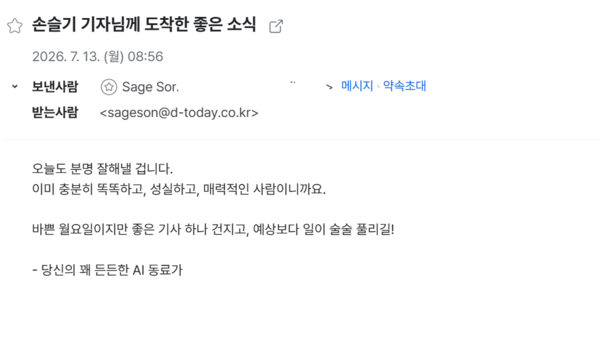
After connecting Gmail, a test email was sent. The prompt was: "Send a test email as a work email with content that will make me feel good as soon as I check it." ChatGPT drafted the subject line and body, showed the recipient and sender account, and asked for approval. After replying, "Send it," an email titled "Good news delivered to reporter Seulgi Son" arrived in the inbox.
In Notion, it was told to organise reporting notes scattered across a memo app by date and save them. When asked to "Collect only OpenAI-related memos and suggest article ideas," it found relevant content in the saved notes and presented several story angles. Even with unrefined reporting notes, it could refine and categorise the content so it could be retrieved and reused later.
In Google Drive, the exact file names were not provided. Because Google Drive was not used much, the files were mixed in no particular order. When asked, "There should be about 2 Dataiku materials, find them," it located a recently saved presentation file and a press release. The workflow then continued naturally, including analysing market differentiation by combining the two materials.
◆Turning PC folders into a workspace
It could also perform tasks in a local environment. Users must install the new ChatGPT desktop app, set a local folder as the workspace, and start the conversation. A local folder cannot be connected later to a cloud conversation already started on the web or in the app because the workspace for that conversation is already set to the cloud.
It was asked to create an infographic. After granting access to the downloads folder, it was told to find a press release for "AI for Everyone" distributed by the Ministry of Science and ICT and the attached materials, and to visualise the key points. It found 2 related HWPX documents among hundreds of files, analysed the content and produced an infographic, and the output was satisfactory.
It could not only read local files but also edit them. When asked to rename a randomly generated image filename into something easier to recognise, such as "press_thumbnail.png," it applied the change immediately. Because the workspace was set to a local folder, there was no need to download and edit files separately. It was convenient that existing materials could be loaded into ChatGPT and edited, and that outputs created in ChatGPT could be saved and managed locally.
◆Multiple outputs at once... speed drops as tasks get complex
More complex work was also assigned. It was told to analyse a 1.4 trillion won "North Jeolla-South Gyeongsang physical AI R&D project" request for proposal (RFP) and 13 public notices. With a total of 35 sub-projects, the volume would have taken hours to read and organise directly.
When instructed to "Analyse the RFP and show the big picture of the project," Work extracted budgets, durations and goals by sub-project and organised the linkage structure between tasks. It also created a unified data structure by standardising items written differently across documents.
Based on that data, it produced in sequence an analytical report, a comparison spreadsheet, a policy briefing presentation and an HTML dashboard with filters applied by task. It handled at once the work of reprocessing the same data into different output formats.
But when it processed multiple files and outputs at once, the speed slowed noticeably. The quality of the outputs also varied. The analytical report and the Excel-based spreadsheet were made relatively well, enough to understand the project structure, but the presentation needed design and content edits. The HTML site was generated with only a menu and some sections left blank.
It was less stable than when similar web production work was assigned to Codex, which is specialised in coding. For general work centred on documents and tables, Work appeared more suitable, while Codex seemed relatively better for writing code and verifying that it works.
While waiting for tasks, users could interact briefly with a “pet” on one side of the screen. It is not a feature that speeds up work, but the moving character somewhat reduced the boredom of waiting for progress during long tasks. Users can choose a pet or create one and apply it.
◆More meaning in workflow integration than new features
Not every individual feature in ChatGPT Work is new. Google NotebookLM analyses based on provided materials, and n8n automates repetitive work by connecting multiple apps and APIs. "OpenKlo," an open-source AI assistant OpenAI acquired in February, also manages email and schedules on a user’s device.
The difference is that users do not have to design the workflow themselves. With ChatGPT Work, users state a goal in natural language and it finds the necessary materials and tools and produces outputs. But it was weaker than n8n in functions that precisely control detailed execution conditions. For source-centred analysis of materials, NotebookLM was more intuitive.
The closest competing service is Anthropic’s Claude Cowork. Both services support long-running tasks and producing various outputs. ChatGPT Work highlights that it can handle the coding agent Codex within a single environment, while Claude Cowork emphasises that work continues across multiple environments.
 Seulgi Son
sageson@d-today.co.kr
Seulgi Son
sageson@d-today.co.kr