
[Digital Today reporter Yoonseo Lee] Google's always-on artificial intelligence (AI) assistant Gemini Spark has been assessed as showing higher-than-expected practicality in everyday tasks such as summarising emails, organising schedules and searching for information.
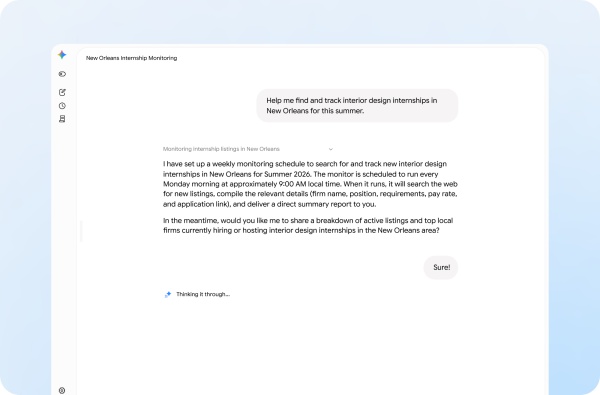
According to IT outlet TechCrunch on May 30 (local time), Gemini Spark is an agent-type AI that runs continuously on a Google Cloud-based virtual machine. It is designed to handle online tasks without users having to leave a laptop turned on.
Gemini Spark was first unveiled in May at Google's annual developer conference. Sundar Pichai (순다르 피차이), Google's chief executive officer, introduced the model at the time and said, "Now you can close your laptop." He highlighted that, unlike other agent-type AI that require a local device to stay on, it can keep working in the cloud.
Its actual range of use was closer to a work support tool than a personal assistant. Gemini Spark links with Google's productivity apps such as Gmail, Calendar, Docs, Sheets and presentations to handle tasks like sorting email, summarising schedules and drafting documents. Some also pointed out that Google's personal productivity examples alone were not enough to give the impression that it is an essential service.
Early use cases showed both strengths and weaknesses. When asked to find discounted items and coupons to buy household goods, it presented sale items and additional discount options, and for some products it even explained how to stack coupons. But some of the promotional codes it recommended could not be used.
It showed relatively high accuracy in creating a travel packing list. After checking weather and event information, Gemini Spark suggested bringing water, sunscreen, sunglasses, a light outer layer and an umbrella. But it had the limitation of not being able to send the output directly to Google Keep. That is why some say it lacks core integration features needed for use as a personal productivity tool.
It also delivered a certain level of results in searching for local programmes and summarising newsletters. Gemini Spark narrowed down programmes about 30 minutes from home and organised distance information as well. But it did not include costs and schedules unless the user asked separately. When asked to summarise a Friday newsletter each week, it quickly selected key reads and links, but provided only 4 items despite a request for 5, and the link connections were not smooth.
Limits were more pronounced in tracking-type tasks. When asked to track the price of expensive cosmetics, the model responded by checking the price again every 2 weeks, which is far from the 'real-time tracking' most users expect. Adding integration with the Model Context Protocol (MCP) could expand the range of external services it can use, but for now tasks are limited if they are not Google services.
There was also criticism of the service structure. Rather than positioning Gemini Spark as an independent product, it would be more appropriate to integrate it naturally into the workflow of tasks users want to carry out. A structure that requires users to distinguish between questions and tasks and choose a separate interface was also cited as an unnecessary burden.
There are additional constraints for iPhone users. Gemini Spark is provided by switching to it separately within the Gemini app, making it hard to invoke immediately using a hardware button or gesture. For this reason, the fact that Gemini's functions are not integrated into a single entry point was also cited as an inconvenience.
Overall, Gemini Spark showed potential as a consumer AI assistant that takes over repetitive digital tasks such as monitoring email, sending schedule alerts and collecting information. But lack of Google Keep support, insufficient external service integration, inaccuracies and a separated brand structure remain issues to be solved for an always-on AI assistant to establish itself as a mass service.
 Yoonseo Lee
yslee@d-today.co.kr
Yoonseo Lee
yslee@d-today.co.kr