
[DigitalToday reporter Jinju Hong (홍진주)] A “cheat sheet” website has been released that lets developers see at a glance the key commands and shortcuts needed when using Claude Code. It is drawing attention as a quick reference tool that removes the need to hunt through scattered documents, making it useful for practical work.
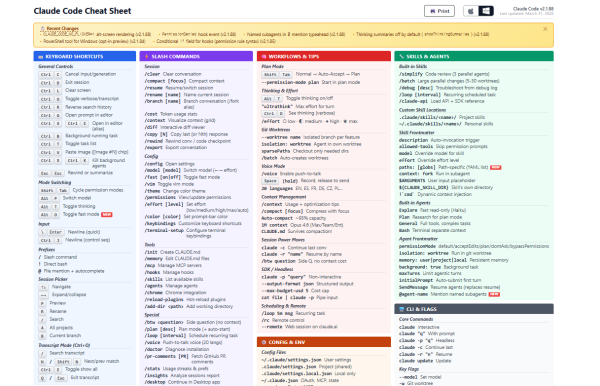
An online outlet, Gigazine, reported on April 1 that the Claude Code cheat sheet is a website that organises major functions on a single page, from keyboard shortcuts to slash commands, skills and agents, Model Context Protocol (MCP) servers, and command line interface (CLI) commands and flags. It is designed to let users quickly check points where they often get stuck during use.
The core is the information structure. The page is divided by function, placing shortcuts and slash commands first, then offering commands related to skills and agents in a separate section. It is designed so developers can immediately find the commands they need without breaking their flow while coding or working in the terminal.
It also includes areas for extensions and integration. In particular, it separately organises commands related to MCP servers, allowing users to quickly check the commands needed when connecting to external tools and expanding capabilities. It also includes a list of CLI commands and flags, increasing usefulness in environments where various options need to be rechecked depending on the situation.
It also emphasises practicality in terms of usability. The site lets users switch between Mac and Windows notation, and they can print it out for paper reference. It is configured to allow teams using different operating systems to work based on the same material.
The release of the cheat sheet is seen as an attempt focused on improving the developer experience rather than adding new features. By bringing together elements such as shortcuts and commands that directly affect work efficiency, it is likely to be used as a supporting tool to raise productivity during onboarding and repetitive tasks.
 Jinju Hong
hongjj@d-today.co.kr
Jinju Hong
hongjj@d-today.co.kr