
[DigitalToday reporter Jinju Hong] Apple has added a range of practical features to its next operating system, macOS 27 'Golden Gate', including Visual Intelligence, automatic password changes and natural-language calendar entry. The update is seen as focusing on cutting repetitive tasks and boosting productivity rather than introducing flashy new functions.
TechRadar reported on July 27 that macOS 27 includes various features to improve the existing Mac experience rather than making major changes to the user interface.
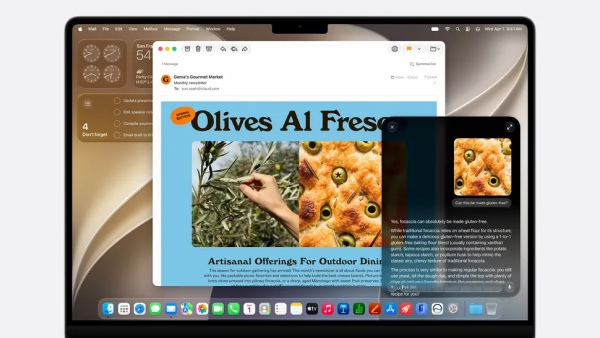
The most notable change is that Apple’s AI feature Visual Intelligence has been expanded to Mac. Previously, it mainly recognised objects or documents through the iPhone camera. On a Mac, users can drag to select part of the screen and then ask Siri questions or carry out tasks based on the selected content.
For example, if a user selects an event schedule on a web page or in a document, the AI can recognise the date, time and location and add it as a calendar event. Even when multiple schedules are mixed on one screen, it can separate and save each as an individual event. Users can also ask questions about what is in an image. TechRadar said the feature works in a "flexible and smart" way and that Siri has moved closer to the personal assistant role it originally aimed for.
Security features have also been strengthened. Apple’s Passwords app has newly added a function that automatically changes leaked or vulnerable login information. Previously, users had to visit each site themselves to edit passwords. Going forward, they can move to the website with a single click and update to new login information.
The feature was first unveiled at the Worldwide Developers Conference in June but drew relatively less attention. The industry, however, sees it as likely to become one of the core functions that are frequently used in practice.
The default Calendar app has also been significantly improved in how users enter information. If a user types a natural sentence such as "Meeting with Kim Cheol-su at Seoul Station at 2 p.m. tomorrow," it can automatically recognise the person, place, date and time and suggest creating an event. It also reflects user context such as a home address or existing contact information, and users can choose only the needed items to add to the event.
Features for users who use both an iPhone and a Mac have also been improved. iPhone Mirroring now allows users to freely resize the window. Previously, the screen ratio was fixed, making some apps inconvenient to use. In macOS 27, users can enlarge the window or adjust it to be longer vertically, and the internal display is automatically optimised accordingly.
Support for external displays has also been strengthened. Until now, Macs have had problems such as not supporting some resolutions when connected to an ultrawide monitor, or resetting existing settings after a monitor is disconnected and then reconnected. macOS 27 supports ultrawide displays with up to 5K resolution and up to 120Hz refresh rates, and it has been improved to keep previous display settings even after reconnecting.
These changes may not look big on the surface, but they are expected to have a noticeable impact for users who use Macs for work. Efficiency is expected to improve, especially in environments where users frequently connect external monitors or use an iPhone and a Mac together.
Apple is presenting macOS 27 as an update that refines usability rather than a sweeping innovation. With a focus on weaving AI functions naturally into everyday workflows and strengthening security and productivity, macOS 27’s competitiveness is likely to depend on how much it improves actual user experience rather than the number of new features.
 Jinju Hong
hongjj@d-today.co.kr
Jinju Hong
hongjj@d-today.co.kr