
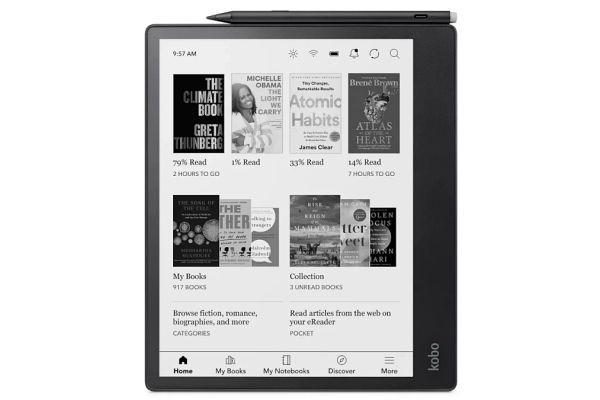
[DigitalToday reporter Jinju Hong (홍진주)] E-Ink tablets may be more suitable than an iPad for users focused on reading and note-taking, an assessment said.
On Sept. 20, IT outlet Engadget pointed to clear differences between E-Ink displays and standard tablets in eye strain, outdoor visibility and battery efficiency.
The key is different use cases. E-Ink tablets are strong for tasks with little screen change, such as books, documents and memos. E-Ink does not emit light from the screen itself, but shows content by reflecting external light. For that reason, Engadget assessed E-Ink as "possibly easier on the eyes" than regular tablets. It also cited the paper-like look of the display as an advantage.
Outdoor usability was also cited as a difference. E-Ink benefits in sunlight because it reflects external light sources. By contrast, standard iPad models can be difficult to view in direct sunlight. The iPad Pro, however, uses a high-brightness tandem OLED display, which the report said addresses much of that weakness.
In device design, matte screens and lighter weight were cited as advantages. Many E-Ink tablets adopt matte displays instead of glossy glass, enhancing the feel of writing on paper. They also offer a different texture from standard tablets when used with a finger or stylus. Battery performance is also affected by the fact that maintaining the screen requires almost no continuous power. Because E-Ink screens use power only when displaying new content or refreshing, they can switch to a low-power state while pages are not being turned. Some products, such as the reMarkable Paper Pro, were mentioned as offering longer usage time than an iPad because of these characteristics.
Still, it was clear that E-Ink tablets are hard to fully replace an iPad. Colour reproduction was cited as a key limitation. Colour E-Ink panels have emerged, but at the current level they struggle to match the iPad's colour gamut and sharpness. Engadget explained that the iPad shows comics, images and web content with higher quality and accuracy.
Differences in response speed and performance are also large. With E-Ink displays, fine particles must physically move each time the screen changes, which makes them weak at depicting motion. As a result, video playback is effectively difficult, and menu navigation or app switching can feel slower than on the latest iPads. Visual issues such as screen flicker or ghosting can also appear.
Hardware configurations also amplify these limitations. Many E-Ink tablets use relatively low-performance processors because they are not designed for high-spec graphics apps or complex animation. Combined with slow refresh rates, the perceived gap can grow when loading complex webpages. Engadget said there are cases where people pick up a smartphone rather than wait for a complex webpage.
Ultimately, it was reaffirmed that E-Ink tablets are suited to static tasks such as reading, drawing and note-taking. By contrast, if video viewing, web browsing or content consumption where colour matters is central, an iPad or Android tablet is more suitable. The conclusion of the comparison was that E-Ink tablets have clear constraints, but are establishing themselves as a practical alternative in text-focused usage environments.
 Jinju Hong
hongjj@d-today.co.kr
Jinju Hong
hongjj@d-today.co.kr